Middle 2017 List Of Cheapest Smartphones That Have Fingerprint Sensor

Modern smartphones look a bit different than ones from just a few years ago: there’s the double rear cameras, of course, but more pervasive is the fingerprint sensor. A fingerprint sensor built into a phone offers a highly convenient form of security, but is also becoming an important component in making mobile payments.
Middle 2017 List Of Cheapest Smartphones That Have Fingerprint Sensor

While a fingerprint sensor is included on all the big flagship handsets, those tend to cost $600 or more. Can you get fingerprint sensor on a (much) cheaper phone? Yes, yes you can. 
Moto E4

Available as of last week, the 5-inch Moto E4 is the fourth generation version of Motorola’s most budget-friendly Moto series, offering consumers a bunch of features — including a fingerprint sensor — at as low as $99. This phone sports a quad-core Snapdragon processor alongside 16GB of storage, a microSD card slot, 4G LTE support, dual microphones, and even a classy fine gold color.

Though the phone costs $129.99 unlocked, it is currently being offered through Republic Wireless and to certain Amazon customers for $99. There’s also a Verizon variant with the same price as the unlocked model, though only in the black color option.


ZTE Max XL

Newly launched by ZTE is its massive 6-inch ZTE Max XL, a handset with a bunch of features and a tiny, relatively speaking, $99 price tag. This phone has a 6″ IPS Full HD display topped with Gorilla Glass, an octo-core processor, microSD support, 3990mAh battery, a 13MP rear camera and, most importantly for this list, a built-in fingerprint sensor. This handset is available through Boost Mobile and Best Buy.

Blu Studio Touch

Phone company Blu offers many varieties of inexpensive unlocked smartphones, and though you can only use them on GSM carriers, they’re a great option if you’re looking to save money. The Blu Studio Touch is one such phone, and it brings with it a fingerprint sensor, as well as a 5-inch HD display, an 8MP rear camera, 2500mAh battery, 4G LTE support, and Android Marshmallow.

Though the phone is very inexpensive at $90 – $99 (depending on store), it’s important to note that it only has a 1GHz quad-core MediaTek processor and 1GB of RAM. That’s fine if you primarily send messages, make calls, and browse Reddit, but will be frustrating if you try to do much more than that.

Coolpad Conjr

There’s a good chance you’ve never heard of Coolpad, but it exists and it has some decent budget smartphones. The Coolpad Conjr offers a fingerprint sensor as one of multiple notable features, others including dual-SIM support, 4G LTE, a 13MP rear camera, a quad-core processor with 3GB of RAM, and 16GB of internal storage (plus a microSD card slot). This phone hits many sweet spots, not the least of which is its $149.99 USD price tag.

iPhone 5s

This one is cheating a bit because it isn’t new, but we’re including it because it is cheap and it is still a nice phone. If you really don’t like Android but you can’t afford the latest iPhone model, the iPhone 5s can now be purchased unlocked (and used) for around $150, give or take twenty, and it comes with a fingerprint sensor. That makes it around the same price as the Coolpad phone listed above, but with much better quality. Where can you find a used iPhone 5s to purchase? Swappa is a popular option, as is Glyde, eBay, and Best Buy Pre-Owned.

CONCLUSION
A fingerprint sensor is quickly becoming a must-have feature, one that extends beyond mere phone locking to encompass mobile payments and online purchase authorizations. Though you’d be best off spending your money on a high-end phone that will last for years, that’s not always an option and there are some excellent, inexpensive phones on the market. Give the Moto E4 a long look, as it is arguably the best (new) phone on the above list, but you can’t go wrong with any of them.


How You Can Send and Also Receive Apple Pay Cash Through Messages in iOS 11

There are many ways to pay other people with your phone. Apps like Venmo and Square Cash let you easily send and receive money at any time, and have recently been updated to work with Siri. Snapchat and Facebook Messenger even let you send money, but now Apple wants in on the easy (transferring) money game. In iOS 11, Apple is bringing person-to-person payments directly in the Messages app. 
iPhone 7, Self-Driving Teslas, Nod to Shop, 4-inch iPhone,, SoundCloud, Autopilot, Textalyzer, HaloLens, Snapchat Spectacles, Affordable Tesla, cars, mp3 converter, samsung galaxy s8, smart device, technology, technews, tech, google search, auto, weather, howto, data trick, data,


Note that this is not a live feature yet, so even if you installed iOS on your iPhonealready, you won't be able to send or receive money yet in Messages. Once Apple officially implements their new Apple Pay Cash program, this is how it will work.

Step 1Set Up Apple Pay

For this to work, you will need to set up Apple Pay. For those who already have a credit or debit card in place, you can skip this step. Otherwise, read on.
Setting up Apply Pay is extremely fast. Just head to Settings -> Wallet & Apple Pay -> Add Credit or Debit Card. Apple gives you the option to use your camera to enter card information, so you do not have to enter your 16-digit card number or your name and expiration date. Your iPhone will then ask for your three-digit security code on the back of your card.
If your card and bank are compatible with Apple Pay, your card should be all set. Note that you may need to contact your bank after setting up your card in Apple Pay. Your phone will tell you if this is a necessary step. Also not that if you like using passes on the lock screen, it's necessary to add payment card in order to use the double-click home button shortcut.

Step 2Message a Friend

Once your card is set up, you can now send or request money. Apple Pay will show up as an option in the new iMessages app drawer at the bottom of the screen. To begin, tap that button and confirm the dollar amount with the on-screen controls. You will have the option to either request or send that amount of money to your correspondent.
Alternatively, if someone requests money from you, you can tap their dollar amount, and the on-screen controls will appear for you to approve or deny it.
Images via Apple

Step 3Manage Your Money

When you receive money, your phone automatically stores it as a digital Apple Pay Cash card. This card allows you to send money to friends, spend money in-person or online, or transfer that money to your bank. This keeps your real card out of the equation, keeping you safe whether you shop in the real world or the digital one.
Image via Apple


How To Type To iOS 11 Siri When You Are Not Talking

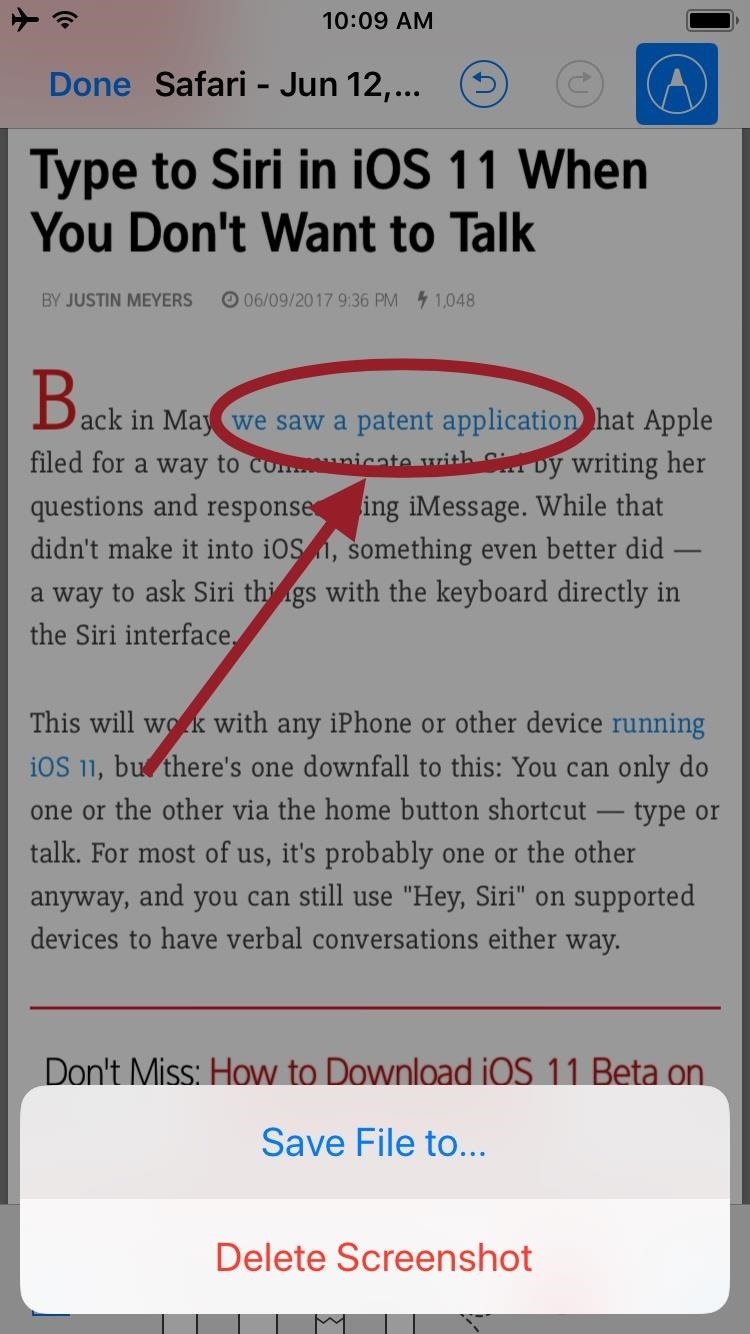
Back in May, we saw a patent application that Apple filed for a way to communicate with Siri by writing her questions and responses using iMessage. While that didn't make it into iOS 11, something even better did — a way to ask Siri things with the keyboard directly in the Siri interface. 
How To Type To iOS 11 Siri When You Are Not Talking

This will work with any iPhone or other device running iOS 11, but there's one downfall to this: You can only do one or the other via the home button shortcut — type or talk. For most of us, it's probably one or the other anyway, and you can still use "Hey, Siri" on supported devices to have verbal conversations either way. 


To switch from voice to text only, just go to Settings -> General -> Accessibility -> Siri, then toggle on "Type to Siri." That's it. While you no longer have to speak, Siri will still respond to you by voice if Voice Feedback is set to "Always On," though there will also be written responses and data cards. Of course, you can adjust your voice feedback setting in the same menu. 


Now, when you want to ask Siri something via typing, just long-press your home button, and the Type to Siri interface will show up with the keyboard. Type out your question or demand, then tap "Done" to get the response.


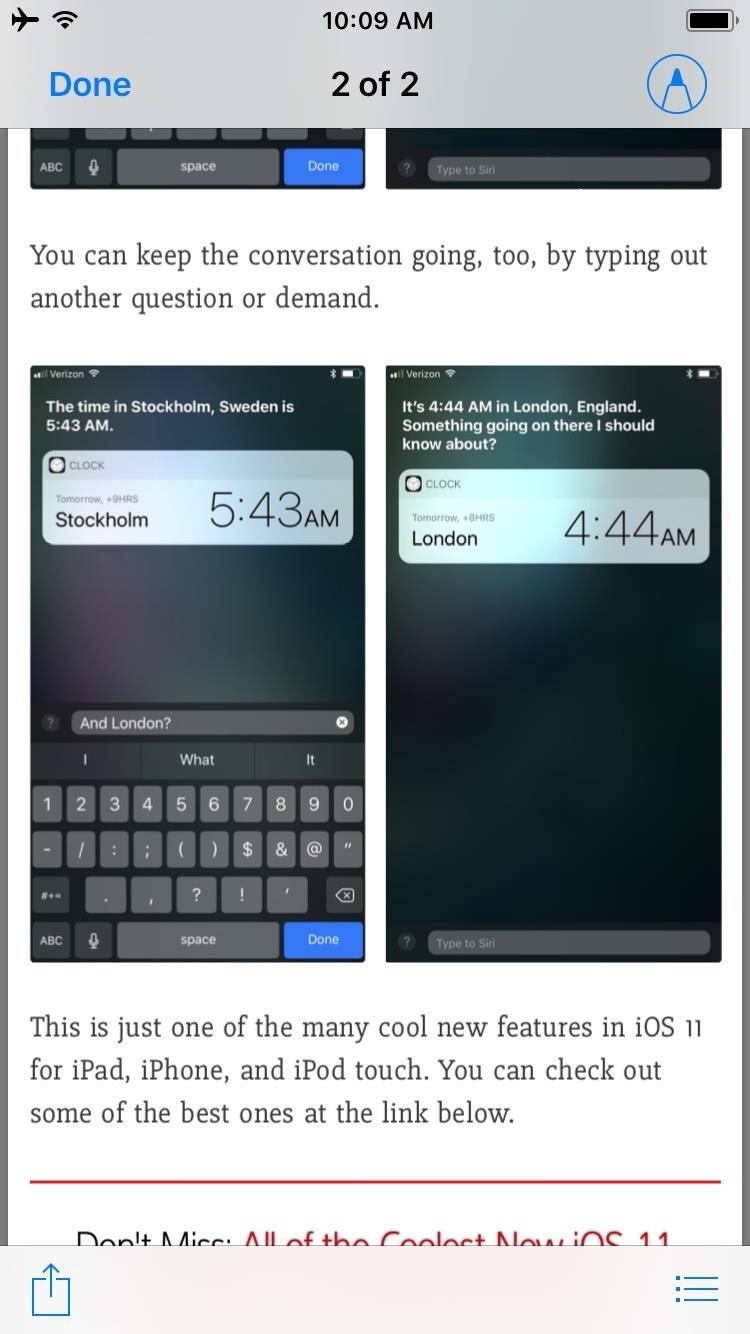
You can keep the conversation going, too, by typing out another question or demand.


This is just one of the many cool new features in iOS 11 for iPad, iPhone, and iPod touch. You can check out some of the best ones at the link below.


How To Save & Markup Notes, Webpages PDF in iOS 11

A fairly hidden feature in iOS 10 let you turn websites and documents into PDFs, but thanks to the new Markup function in iOS 11, this process has become a lot more streamlined. 
How To Save & Markup Notes, Webpages  PDF in iOS 11


Not only can you save webpages, notes, and other files as PDFs for easy sharing, but iOS 11 even lets you insert notes, draw shapes, and highlight text in the PDF files before you save them. It's similar to the new screenshot editing feature, but it's bundled into a new Share Sheets entry that makes it easy to save almost any file. 

Step 1Share a Note, Webpage, or Other File

To save almost anything as a shareable PDF, you'll simply need to access iOS 11's new Markup as PDF option. So far, we've found that this option is available in Photos, Notes, Safari, and the new Files app, though more compatible apps could be added by the time iOS 11 makes its public debut this fall.
So when viewing a website, note, or similar file, start by tapping the Share Sheets icon on your screen. There will be two rows of share options — scroll over to the right of the bottom row and select "Markup as PDF." 

Markup as PDF (Optional)
Next, you'll see a preview of the PDF file that will soon be created. From this screen, you can tap the pencil icon in the top-right corner if you'd like to add any notes to the file before saving. If you do that, you'll be able to select from the row of tools at the bottom of your screen to draw, write, highlight, or even add shapes to the document. 

Save as PDF
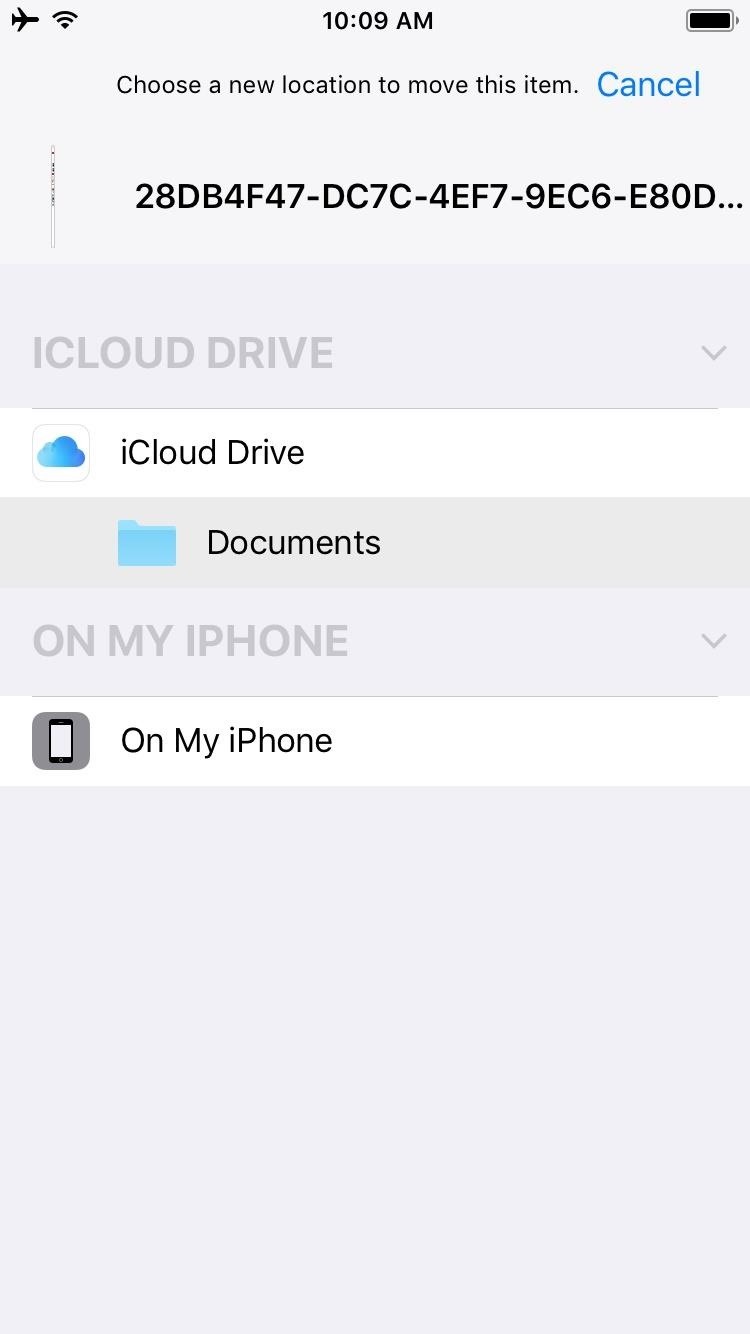
Next, whether you marked up the file or not, just tap the "Done" button in the top-left corner, then press "Save File to..." to save your PDF. From here, you'll be prompted to choose a save location for the PDF, and the options are either iCloud Drive or your phone's local storage, so select whichever you'd prefer.

Step 4View Your PDF

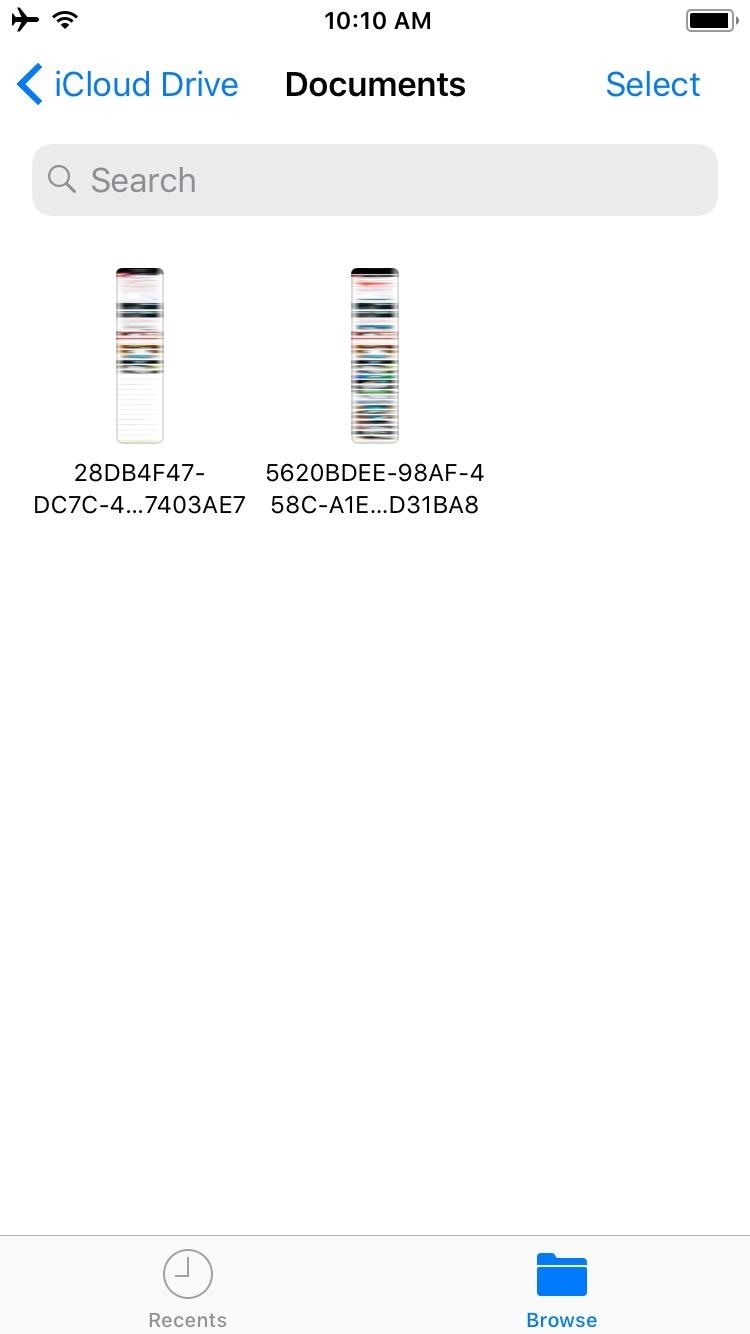
At this point, your PDF is ready to view and share. To check it out, open the Files app, then browse to the location where you saved the file. As you'll see when you open the PDF, it's a full copy of the entire document or website you were viewing when you selected the "Markup as PDF" option in the original app.
From there, you can tap the Share Sheets icon in the bottom-left corner to send your PDF over any compatible service, so it's a great way to share files with friends or simply save a copy for yourself. What websites, notes, or other files have you saved as PDFs using this method? Let us know in the comment section below.


Apple Reportedly Slashes iPhone, iPad and Mac Prices in India

Apple is slashing the market retail price of its product portfolio including iPhones, iPads and Macs in India starting July 1. Apple has not confirmed whether the price cut is based on the new tax reform, but CEO Tim Cook recently appreciated the government's move to implement GST during PM Modi's visit to the United States. Under the GST regime, smartphones are now taxed uniformly at 12 percent, while they were previously taxed anywhere between 8 to 20 percent depending on the state. 
iPhone 7, Self-Driving Teslas, Nod to Shop, 4-inch iPhone,, SoundCloud, Autopilot, Textalyzer, HaloLens, Snapchat Spectacles, Affordable Tesla, cars, mp3 converter, samsung galaxy s8, smart device, technology, technews, tech, google search, auto, weather, howto, data trick, data,


The Cupertino-based tech giant is offering up to 7.2 percent discount on the iPhone range in India. Apple's iPhone SE with 32GB storage now starts at Rs 26,000, a discount of Rs 1,200, while the 128GB model gets discounted by Rs 2,200 to a retail price of Rs 35,000. The iPhone 6s 32GB and 128GB models are now priced at Rs 46,900 and Rs 55,900 respectively, while the larger iPhone 6s Plus will retail for Rs 56,100 and Rs 65,000 respectively for the 32GB and 128GB storage variants. 


Apple is offering a maximum discount on its premium iPhone 7 Plussmartphone. The Apple iPhone 7 Plus with 128GB gets a price cut of Rs 6,600 and will now retail for Rs 85,400. The iPhone 7 Plus 128GB variant was announced in India at a retail price of Rs 92,000. The iPhone 7 starts at Rs 56,200 for the 32GB variant, Rs 65,200 for the 128GB variant and Rs 74,400 for the 256GB variant.


Apple is also cutting the price of its iPad lineup with the newly announced 10.5-inch iPad Pro getting a price cut even before it goes on sale. The new 12.9-inch Ipad Pro with 512GB storage will retail for Rs 97,000, down from the 1 lakh plus price tag at the time of launch. The 10.5-inch iPad Pro now starts at Rs 50,800 for the 64GB WiFi-only variant and goes all the way up to Rs 84,500 for the 512GB variant with Wi-Fi and Cellular support.


The price of Apple MacBook Air remains unchanged, but the new 12-inch MacBook now starts at Rs 1,04,800, down from Rs 1,09,900. The 13-inch Macbook Pro, on the other hand, gets a discount of Rs 5,000 on the base model. The 13-inch MacBook Pro now starts at Rs 1,04,900 for the non-Touch Bar model, and goes up to Rs 1,64,100 for the 512GB variant with Touch Bar. The 15-inch MacBook Pro will retail at Rs 1,95,800 and Rs 2,28,100 respectively.

Apple CEO Tim Cook has repeatedly stated that India remains one of the top priority markets for the company. With the new price cut, Apple seems to be passing the benefits of GST to consumers.


OnePlus 5 Beat The iPhone In Speed Test As The First Android Phone To Do So

OnePlus 5 had been already launched in India the phone is available on Amazon. OnePlus 5 which is a successor to the OnePlus 3 and OnePlus 3T had become the highest revenue grossing smartphone on Amazon India in Launch week.
OnePlus 5 Beat The iPhone In Speed Test As The First Android Phone  To Do So

OnePlus 5 features a huge 5.5inch Optic AMOLED display that comes with 1080p. The phone is 7.25mm thin and houses the fingerprint sensor on a home button. The phone features a dual rear camera setup that consists 20-megapixel sensor with f/26 aperture and a 16-megapixel sensor with f/1.7 aperture.


The phone comes in two variant 6GB RAM + 64GB internal and 8GB RAM + 128GB internal. The phone also sports the latest Qualcomm Snapdragon 835 SoC and it will run on Android 7.1.1 Nougat OS out of the box, with the custom Oxygen OS on top of it.
There is always a competition between Android and iOS. Recently, we spotted a speed test video which clearly shows that OnePlus 5 is a better performing smartphone than Apple’s premium offering.
YouTuber David Rahimi, who maintains a YouTube channel PhoneBuff had previously shared some speed comparison videos that features the latest iPhones against top-end Android devices from Samsung, LG, Google etc. However, in all speed test videos, iPhone held the top spot in rankings since the release of iPhone 6S in the year 2015.
However, OnePlus 5 seems to be first Android smartphone ever that had managed to outperform an iPhone 7 Plus. The video consists of two rounds- In the first round, the YouTuber shows which device opens apps faster. The second round shows the multitasking capability of the smartphone.
OnePlus 5 which carries 8GB RAM, outdid the iPhone 7 Plus, as it was able to keep more apps running in the background without becoming sluggish. The huge RAM is what made the OnePlus 5 a full seven seconds speedier than the iPhone 7 Plus.
You can watch the full speed test video from here:
So, what do you think about this? Share your views in the comment box below.