How To Make Sure “Drop In” Feature Is Totally Disabled For Your Amazon Echo

Not everyone is excited about Amazon’s “Drop In” intercom-like feature. But Amazon enables it by default—even if you choose “Later” at the splash screen. So here’s how to turn it off entirely. 
How To Make Sure “Drop In” Feature Is Totally Disabled For Your Amazon Echo


Amazon’s recent Echo update builds on the new Echo calling/messaging platformthey released earlier this year. It allows people from your contacts list (including other echos in your house) to “drop in” any time they want to chat with you—like an intercom. 


Technically, this feature is opt-in—you have to approve certain contacts before they can drop in on you. But the feature itself is still enabled by default, which is strange (and annoying). If you like the feature and enjoy using it either as an instant-calling tool between you and your friends (or just as an intercom system in your house), that’s great. But if you don’t want anything to do with the feature, we’ve got you covered.

First things first, you’ll disable any enabled “drop-in” contact settings you’ve set (if you’ve tried the feature out). If you haven’t used the feature, you probably don’t have any contacts set to allow drop-ins, but it doesn’t hurt to double check.

Open up the Alexa app on your mobile device and select the messaging icon in the middle of the bottom navigation bar, then click on the contacts icon in the upper right corner, as seen below.


Within the Contacts menu, select all of the contacts (one at a time) that you’ve enabled the drop in feature with. If you’ve only used the drop in feature as an intercom, then the only contact you’ll need to worry about is your own.


Toggle “Contact can Drop In anytime” to off.


Repeat this process for any other contacts you may have enabled.

Next, we recommend toggling the “drop in” settings on each individual Echo unit. Strangely, even though you’re not fully opted in to the drop in feature when you receive the update, the Alexa app automatically turns on the “drop in” feature on every Echo connected to your account. Even though technically this doesn’t fully activate the system until you pair it with an approved contact, this didn’t sit very well with us. If we skip a setup step by selecting “later” that doesn’t, in our minds, translate to “OK we’ll start the process for you and partially enable it.”


Open up the Alexa app again and select the menu icon in the upper right corner. Note that the app is now complaining that we disabled its access to the phone’s contact list. That’s because we went even further and removed the Contacts permission from the Alexa app—which isn’t entirely necessary, but we did it anyway.


Within the menu, select “Settings”.


Within the Settings menu, select any of your Echo devices that are drop in compatible, like the Echo and Echo Dot seen here.


In the settings for each individual device, select “Drop In”.


Select “Off”.


Congratulations! After wading through far too many menus you’ve successfully toggled off every single setting related to the new drop in feature and you can go back to using your Echo the way you did in the pre-Echo-messaging days.


Master Lock Launches 'Select Access Smart'; A Digital Safe For Your Keys

Master Lock, an American security company with nearly 100 years of experience, has released the Select Access Smart digital safe to keep items such as keys protected from thieves and to give access to trusted people.
iPhone 7, Self-Driving Teslas, Nod to Shop, 4-inch iPhone,, SoundCloud, Autopilot, Textalyzer, HaloLens, Snapchat Spectacles, Affordable Tesla, cars, mp3 converter, samsung galaxy s8, smart device, technology, technews, tech, google search, auto, weather, howto, data trick, data,


The Select Access Smart is a relatively compact box, measuring 13cm high and 8cm wide, and is constructed from zinc. Master Lock knows it will be used outside most of the time, so has tucked electrical components away behind a bumper to make sure they're weatherproof. 


Master Lock's new safe is controlled via the Vault eLocks smartphone app, available for iOS and Android. As long as you have your phone on you, and Bluetooth is turned on, you can press the button on the front of the safe to open it. You don't need to get your phone out your pocket and hold it near the box.


The owner or admin of the safe can give permission for any of their contacts to be able to open it via Bluetooth, and can set whether access is permanent, or just on a temporary basis. Access can even be set by day and time, so you could give limited access to a builder for example, just for when you know they're going to be at your house when you're out.

However, if the app isn't installed, access can still be granted by entering a numerical code on the backlit keypad on the front of the safe.
Not only can the app be used to grant access to other users, but it can also warn of any suspicious activity, such as someone trying to break in.

The built-in battery claims to last for two years, but when it does eventually run out, and someone still needs access before replacing the CR123 cylinder battery, a jump function can give a small boost of battery so the keys can be accessed.

The Master Lock Select Access Smart is available now for £109.


Disabling Echo Show YouTube Restricted Mode So That No Videos Go Missing From Search Results

The Echo Show lets anyone start playing YouTube videos on its small display. If you have little ones in the house, you might not want them watching everything you can find on YouTube. To fix this, the Echo Show comes with YouTube Restricted Mode enabled out of the box that filters adult content. Here’s how to turn it off.
Disabling Echo Show YouTube Restricted Mode So That  No Videos Go Missing From Search Results

To turn off YouTube Restricted Mode, swipe down from the top of the screen and tap Settings.
Scroll down and tap Restrict Access.
At the bottom of the list, tap YouTube. 


Tap the YouTube Restricted Mode toggle. You’ll have to enter your password to disable the toggle. Tap Enter Password and use the on-screen keyboard to type in your password.
Once that’s done, you’re all set! Now, when you search YouTube for videos, you’ll get all the saucy adult content you can find. Within YouTube’s content guidelines, of course.


Apple Reportedly Slashes iPhone, iPad and Mac Prices in India

Apple is slashing the market retail price of its product portfolio including iPhones, iPads and Macs in India starting July 1. Apple has not confirmed whether the price cut is based on the new tax reform, but CEO Tim Cook recently appreciated the government's move to implement GST during PM Modi's visit to the United States. Under the GST regime, smartphones are now taxed uniformly at 12 percent, while they were previously taxed anywhere between 8 to 20 percent depending on the state. 
iPhone 7, Self-Driving Teslas, Nod to Shop, 4-inch iPhone,, SoundCloud, Autopilot, Textalyzer, HaloLens, Snapchat Spectacles, Affordable Tesla, cars, mp3 converter, samsung galaxy s8, smart device, technology, technews, tech, google search, auto, weather, howto, data trick, data,


The Cupertino-based tech giant is offering up to 7.2 percent discount on the iPhone range in India. Apple's iPhone SE with 32GB storage now starts at Rs 26,000, a discount of Rs 1,200, while the 128GB model gets discounted by Rs 2,200 to a retail price of Rs 35,000. The iPhone 6s 32GB and 128GB models are now priced at Rs 46,900 and Rs 55,900 respectively, while the larger iPhone 6s Plus will retail for Rs 56,100 and Rs 65,000 respectively for the 32GB and 128GB storage variants. 


Apple is offering a maximum discount on its premium iPhone 7 Plussmartphone. The Apple iPhone 7 Plus with 128GB gets a price cut of Rs 6,600 and will now retail for Rs 85,400. The iPhone 7 Plus 128GB variant was announced in India at a retail price of Rs 92,000. The iPhone 7 starts at Rs 56,200 for the 32GB variant, Rs 65,200 for the 128GB variant and Rs 74,400 for the 256GB variant.


Apple is also cutting the price of its iPad lineup with the newly announced 10.5-inch iPad Pro getting a price cut even before it goes on sale. The new 12.9-inch Ipad Pro with 512GB storage will retail for Rs 97,000, down from the 1 lakh plus price tag at the time of launch. The 10.5-inch iPad Pro now starts at Rs 50,800 for the 64GB WiFi-only variant and goes all the way up to Rs 84,500 for the 512GB variant with Wi-Fi and Cellular support.


The price of Apple MacBook Air remains unchanged, but the new 12-inch MacBook now starts at Rs 1,04,800, down from Rs 1,09,900. The 13-inch Macbook Pro, on the other hand, gets a discount of Rs 5,000 on the base model. The 13-inch MacBook Pro now starts at Rs 1,04,900 for the non-Touch Bar model, and goes up to Rs 1,64,100 for the 512GB variant with Touch Bar. The 15-inch MacBook Pro will retail at Rs 1,95,800 and Rs 2,28,100 respectively.

Apple CEO Tim Cook has repeatedly stated that India remains one of the top priority markets for the company. With the new price cut, Apple seems to be passing the benefits of GST to consumers.


Microsoft To Start Prompting Users To Install The ​Windows 10 Creators Update

If you're still running a version of Windows 10 earlier than April's Creators Update, Microsoft will this week start reminding you to upgrade.

Upgrading is particularly important for consumers still on the original Windows 10 version 1507, which as of May 9 no longer receives security and quality updates. This group of users will get a notification and prompt to "update now".

Microsoft To Start Prompting Users To Install The ​Windows 10 Creators Update


People on the still-supported Windows 10 November Update (version 1511) and Anniversary Update (version 1607), will receive a gentler reminders from Microsoft to review their privacy settings, which include new choices Microsoft created in response to earlier criticism over Windows 10 privacy and data collection. These include settings for location, speech recognition, diagnostics, tailored experiences with diagnostics data, and relevant ads. 


The privacy review reminders this week are part of Microsoft's attempt to prepare users to install the Creators Update, which can only install after users review the settings.

For customers wary of being shepherded into an unwanted upgrade, Microsoft notes you can postpone the privacy setting review process up to five times. Also, Microsoft stresses that it's not changing the update experience itself with the choice still available over when the update occurs.

Still, the company is urging users to install the Windows 10 Creators Update as soon as possible for obvious security reasons given the recent ransomware outbreaks, which hit un-patched systems and Windows 7 but left Windows 10 systems unscathed.

"By staying up to date on both the latest feature and quality updates, you're assured of being on the most secure version of Windows 10," says John Cable, director of program management, Windows Servicing and Delivery.


In feature updates Microsoft delivers new defense-in-depth security, such as exploit mitigation technologies, to prevent threats like ransomware. Cable notes that monthly quality updates include another layer of security that "tracks emerging and changing trends in malware" to protect systems from newer threats.


ONEPLUS 5: Here Are Strong Reasons Why You Should Buy The Oneplus 5

The OnePlus 5 was highly anticipated by fans. Since a few days ago, the smartphone has been available on the OnePlus website. The question is: should you buy it? Here are a few things that might convince you.
ONEPLUS 5: Here Are Strong Reasons Why You Should Buy The Oneplus 5


High performance
Performance is one of the biggest strengths of the OnePlus 5. The Chinese manufacturer threw in everything in terms of technical configurations for the phone: it not only has one of the best processors on the market, the Snapdragon 835, but also has a huge 8 GB of RAM. This is so much that we wondered whether it’s even worth having such a big amount, but in terms of showing off, the OnePlus 5 does a very good job. 


In practice, the phone knows really puts on a good show On a daily basis, it shows great flexibility, with no sign of weakness. Thanks to the processor and the antennas, the connection speed is very fast and the UFS 2.1 memory ensures good responsiveness when launching apps. If you’re a follower of theoretical results, below you’ll find the benchmark results compared to those obtained on the Galaxy S8. However, do beware of the results, the Chinese manufacturer was singled out for cheating on some benchmarks, but we still don’t understand the intent given its technical record.


Benchmarks: OnePlus 5 vs Galaxy S8


A high-quality camera
It's no secret: a high-end device must have a high quality camera. OnePlus has passed this challenge with flying colors. Like many of its competitors, it offers a dual camera at the rear, with one sensor offering 16MP for a f / 1.7 aperture, and the other 20MP for a f / 2.6 aperture. Obviously, there’s image stabilization, but unlike some competitors it’s not optical, but electronic. At the front, there is a 16MP sensor with a f / 2.0 aperture, again with an electronic stabilizer.

Given the facts, you now know what hardware you’re dealing with. The photos are of good quality, although they aren’t able to compete with the Google Pixel, which is still the undefeated champion in this field. Although the brightness is good and the pictures look great, it can get a bit more difficult if you’re in a darker environment - you see this for many smartphone brands. You can get a more concrete idea of the photos by following the link below.
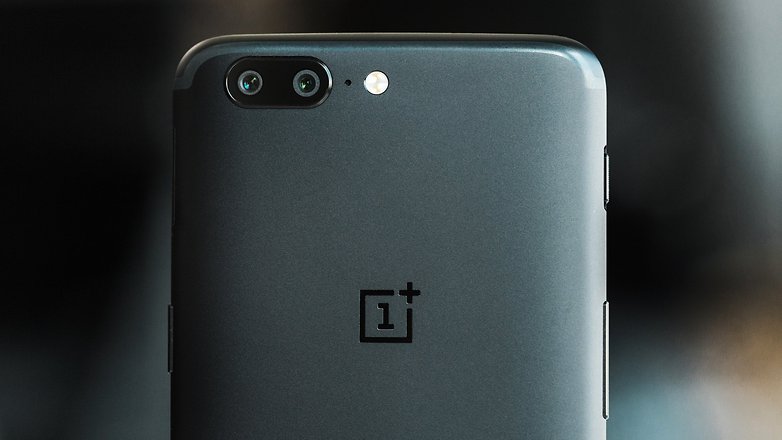
See photos taken with the OnePlus 5The dual camera is one of the OnePlus 5's strengths.
Bluetooth 5 connectivity
In a world where we use more and more accessories, Bluetooth has become an important feature. Whether you want to connect your speakers at home or your headphones while doing sport, or connect your smartwatch or any other connectable device, your smartphone needs to offer a stable Bluetooth connection.

This new device from OnePlus offers the latest version of this technology: Bluetooth 5. You’ll be equipped for the future, with Android O supporting this technology. For compatible devices, Bluetooth 5 will give you better quality transfers (notably the audio), but also offer wider range (a hundred meters).
You should ditch any smartphone without Bluetooth 5

High-speed charging
OnePlus uses a fast charging technology called "Dash Charge". Is it faster than other types of charging? Yes, based on an experiment in the field. Of course, the difference isn’t colossal, but it's worth nothing OnePlus' superior performance in this area.

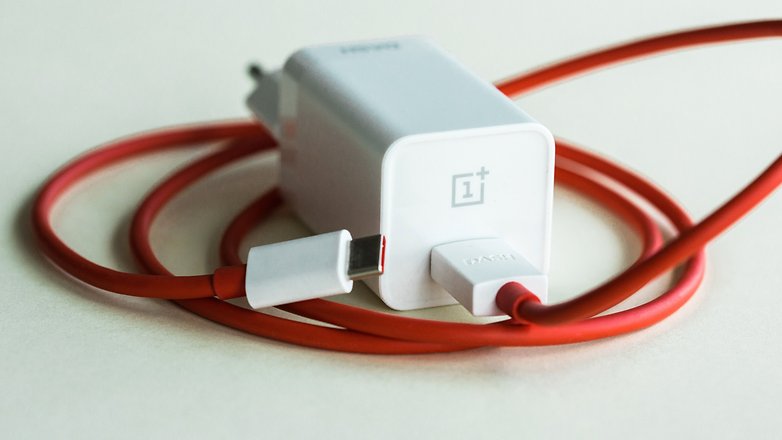
In practice, you get 60% charge in just 30 minutes of charging. As mentioned by another AndroidPIT editor, the charge time of smartphone (and tablet) batteries is proportional to the charge level: the higher the battery percentage, the longer it takes to charge the device. The competition is also facing this problem, but doesn’t fare as well as the OnePlus with its Dash Charge technology.Here is the Dash charger and its cable.

A good price/performance ratio
Consumers almost always consider the price of products to be excessive, that's a given. The OnePlus 5 is no exception to that rule, some find it too expensive, especially if one takes into account the increasing price tag on the last few OnePlus models. But one must see things from another perspective: the OnePlus 5 almost has as much potential (in all categories combined) as other high-end devices on the market, and it’s presented at a much lower price.

Do you plan to buy the OnePlus 5? If so, which argument convinced you? Let us know your thoughts in the comments below


Amazon Prime Member Can Now Exclusively Buy Nokia 6, Moto E4, And Alcatel Smartphones

Amazon Prime Members are in for a treat, as the retailer is putting not one but five smartphones on sale just for them.
While the selection doesn't include the likes of the Samsung Galaxy S8 or the iPhone 7, it does have the Nokia 6, the Moto E4, and three Alcatel smartphones — the Idol 5S, A50, and A30 Plus.
Amazon Prime Member Can Now Exclusively Buy  Nokia 6, Moto E4, And Alcatel Smartphones


In other words, Amazon is making affordable phones even more budget friendly, but as is the case with all things that seem too good to be true, there's one small catch: They'll be loaded with ads as part of the company's Prime Exclusive Phones program.
If that's not a deal breaker, then Amazon has got you covered on what could be your next smartphone. 


Amazon Prime Smartphone Sale

Nokia 6 goes down to $179.99 from $229.99 (save $50): Recently confirmed to arrive in the United States this July, the Nokia 6 is one of those smartphones that can simply get the job done, and it doesn't leave a hole in your pocket to boot.
It sports a 5.5-inch Full HD display with a 1,080 x 1,920 resolution, a decent Snapdragon 430 paired with 3 GB of RAM, 32 GB of native storage, and a 3,000 mAh battery. Out of the box, it'll run on Android 7.1 Nougat.

Moto E4 drops to $99.99 from $129.99 (save $30): Basically the budget version of the Moto G5 Plus, the Moto E4 brings modest performance to the table. Under the hood, it has a Snapdragon 425, 2 GB of RAM, 16 GB of internal storage, and a 2,800 mAh battery. It runs on Android 7.1 Nougat from the get-go and features a 5-inch HD display.

Alcatel Idol 5S gets $200 price tag instead of $280 (save $80): Coming in as the high-end option out of the bunch, the Alcatel Idol 5S packs a 5.2-inch Full HD display, Snapdragon 625, 3 GB of RAM, 32 GB of storage, and a 2,620 mAh cell and runs on Android 7.1 Nougat.

Alcatel A50 will hold back customers by $100 instead of $150 (save $50): Deviating from the Snapdragon trend going on here, the Alcatel A50 is powered by a MediaTek 6738 and 2 GB of RAM. It offers 16 GB of storage, a 5.2-inch HD display, a 2,800 mAh battery, and Android 7.0 Nougat.

Alcatel A30 Plus slashed down to $80 from $130 (save $50): As the cheapest option in the list, the Alcatel A30 Plus houses a MediaTek 6738, 2 GB of RAM, 16 GB of storage, and a 3,000 mAh battery and features a 5.5-inch HD display. Just like the A50, it runs on Android 7.0 Nougat.
Note: Only the Moto E4 is compatible with all four major U.S. carriers, namely AT&T, T-Mobile, Sprint, and Verizon. The rest will work only on AT&T and T-Mobile.

Amazon Prime Discounts Not Free

As mentioned earlier, the Prime Exclusive Phones program puts certain smartphones up for sale in exchange for built-in ads. Put simply, those preloaded offers let Amazon earn back the cost of placing discounts on these devices.
For those who are thinking to buy the phones and just get rid of the company-specific modifications later, it's not that easy to pull it off. But it's not impossible, either.

The Bottom Line

Sure, knowingly giving Amazon the go-ahead to fill your phone with unwanted offers seems off-putting. Still, it's a good way to save a couple of bucks, but if the ads are too much to handle, then it's better to go with the standard models. The price difference isn't that big, after all.


Cheap Top-Rated Mechanical Keyboards Below $40 Listed Here

Mechanical keyboards are all the rage computer enthusiasts and gamers. If you’ve been using a rubber dome or scissor switch keyboard for your whole life, buying a new clicky keyboard might be intimidating, to say nothing of the considerable expense. Even the cheapest models from mainstream suppliers start at around $80, and go well into the hundreds for RGB lights and programmable extras—a lot of dough to drop on something you aren’t sure you’ll like. 

To that end, we’ve gathered a collection of dirt-cheap mechanical keyboard picks. These all come from relatively unknown brands with cheaper components than most of the enthusiast models, but they’ll give you a good place to start if you want to investigate the wider world of mechanical keyboards. Best of all, they’re each $40 or less, so trying them out won’t cost you much more than a standard keyboard. 


Why These Keyboards Are So Cheap

First, let’s temper your expectations just a little bit. These are, obviously, not as high quality as some more expensive keyboards—but we were surprised at how good they were. Some of it has to do with general build quality, but a big factor is the switches inside.
The individual key switches are what make mechanical keyboards unique: their complex spring-and-slider construction gives the keys a much longer, more satisfying “feel” than rubber dome keyboards, which is why they’re so coveted by typists and gamers. German corporation Cherry has been manufacturing its patented MX switches for over 30 years, and while they’re not the only switches that can be found in mechanical keyboards, they are the de facto standard.
Since the patent on Cherry MX switches expired, competitors have made “clone” switches that are generally sold to keyboard manufacturers for much less. These switches have the same basic characteristics as Cherry MX switches, including cross-shaped stems that are compatible with the same keycaps, and different colors corresponding to different switch types. The main difference: these clone switches are mass manufactured in China with (presumably) less strict tolerances gives them a looser, more shaky feel than the genuine article. That said, they’re very much preferred by bargain-hunters, since real Cherry MX switches or equivalents cost about a dollar per switch, instantly putting keyboards outside the range of an impulse purchase.
In addition, these keyboards tend to lack more advanced features like programmable RGB backlighting (or backlighting at all, in some cases), detachable USB cables, and other niceties like that. You may find one of those features occasionally, but you’ll rarely find them all on one board.
Cherry MX  switches come in different colors, each coded to quickly explain different variables of the switch itself: the strength of the spring, the “bump” or lack thereof at the point where a stroke is registered, and whether the key makes an audible “click” as it’s pressed. Other manufacturers have copied the color coordination scheme along with the Cherry MX switch design, so we’ve broken the recommendations below along those lines.

The Best Cheap Keyboard With “Blue” Switches: Redragon K552-M KUMARA

Blue switches are generally preferred by typists, thanks to a low actuation force and a loud “click” with each press of the key. It’s odd, then, that the Redragon board ($30) is explicitly aimed at “gamers,” who tend to prefer a linear switch for rapid key presses (see below). Nevertheless, this model is one of the cheapest on the market at just $30. More expensive models can be had with different flavors of LED lighting, but they’re all equipped with the same blue clicky switch. (The Amazon listing for the Redragon says that it uses “Cherry MX Green equivalent” key switches, but this appears to be a mistake—they’re definitely Blue clones.)
The switches themselves come from a company called Outemu, a common supplier of “clone” switches. Though the stems are a tiny bit more loose with a stiffer central spring than standard Cherry MX Blues, they give an acceptable approximation. The tenkeyless (also known as “TKL”) layout is plenty for most users who don’t do rapid data entry, but there’s also a full-size version with a number pad called the Redragon VARA ($40) for those who prefer it. Standard key sizes mean that aftermarket keycaps can be installed. The Redragon comes with a free plastic keycap tool for pulling them off, but the USB cable is fixed in place.


The board seems to have a bit of metal in the case (if not a full metal plate), which is something of a luxury at this price point, and gives it more heft and stability than other budget keyboards. The keycaps aren’t especially attractive, with standard ABS plastic and stamped legends that will wear down fast under constant typing. The case has a significant lip at the edges, which will make it harder to clean, but the Cherry-style stabilizers will save some headaches when swapping out longer keycaps. The Redragon board can be had with rainbow, all-red, or multicolor RGB lights for a bit more cash.
If you don’t like the look of the Redragon, you have a few other options with blue switches:
  • This Eagletec model ($40) is a bit larger, has a full metal plate, and (for a few more bucks) has options for blue LEDs or a fetching white-on-silver color scheme, with the same Outemu blue switches.
  • You can also grab this keyboard for $33, though and it’s available from a few different suppliers with their logos stamped onit: TOMOKO, Mpow, and Pictek. You can find full size versionstenkeyless versions, and backlit versions out there—just make sure you search all three brand names to cover all your bases.
  • If you prefer a smaller layout, the Qisan Magicforce (discussed in more detail below) is available in a blue switch variant for $40.
  • Another small alternative is the the DREVO 84 keyboard ($40), which includes white backlighting, doubleshot keycaps, and a choice of blue, brown, red, or black (like red, but stiffer) switches. Its non-standard layout will take some getting used to, though, and finding a full keycap set might be harder, so we don’t recommend it for beginners.

The Best Cheap Keyboard With “Brown” Switches (and a Small Form Factor): Qisan Magicforce Mini

Brown-style switches use a tactile bump to give physical feedback and a light spring like Blue switches, but without the distinct “click” sound. They’re a popular alternative, a sort of middle ground between the noisy blue switches and smoother linear designs. The Qisan Magicforce Mini ($40) is a great way to test them out, and it’s often recommend as a starting point by mechanical keyboard enthusiasts. (If you prefer gold, this version is the same price with a different color plate.)
Outemu Brown switches are pretty much spot-on replicas of Cherry or Gateron Browns, with a satisfying bump at a much lower volume than the Blues. The keycaps feel a bit flimsy and standard printing won’t last forever—a big drawback with some of the odd choices for volume and media keys on the function layer—but overall it’s hard to find a better small mechanical keyboard for just forty bucks.
The smaller format is well thought-out: it uses the popular 60% layout (dispensing with the function row) but adds back a full arrow cluster and the Delete, Insert, and Page Up/Down keys for less reliance on a function layer. You’ll still be wishing for a bigger keyboard if you often use F1-F12, but for everyone else, it’s an elegant compromise. A very thin aluminum plate doesn’t do much for stability, but the removable microUSB cable, small size, and light weight make this one handy for travelling. And like the Outemu switches above, the ones in this keyboard also come with Cherry-style stabilizers for easy keycap swaps, with a keycap tool included in the box.
There are Magicforce keyboards with backlighting, as well as full-size variants, but they’re much more expensive, running around $70. You can also get the smaller versions with blue or red switches at the same $40 price point, if you prefer those. But for other cheap brown-switched boards, there are a few others available:
  • If need a keyboard with shiny LEDs, the Velocifire TKL01 ($30) will give them to you with “Brown” switches and a slightly larger build.
  • A good compromise between them is the TKL78 ($30), also from Velocifire, which uses a “75%” layout with a full function row, but a shorter layout with the arrow cluster crammed into the right modifier area.
  • The DREVO 84 keyboard ($40) includes white backlighting, doubleshot keycaps, and a choice of blue, brown, red, or black (like red, but stiffer) switches. Its non-standard layout will take some getting used to, though, and finding a full keycap set might be harder, so we don’t recommend it for beginners.

The Best Cheap Keyboard With “Red” Switches: LESHP Backlit Keyboard

“Red” switches are the most common among keyboards specifically designed for gaming, because they combine a relatively light spring with a linear slide action. There’s neither a tactile bump nor an audible “click” when pressing down on the key, it’s just smooth motion up and down. Red-style clone switches are especially hard to find in cheaper boards, though, which tend to go with brown or blue switches for broader appeal. Thankfully, the oddly-named LESHP keyboard includes them for just $40.
The LESHP board is aesthetically the least pleasing of our three recommendations: though the build is light plastic throughout with exposed screws, the black case is clearly trying to ape the Razer BlackWidow design. That comparison isn’t helped by the “rainbow” LEDs, which, despite their appearance, are not true RGB—each row only lights up one color (though an all-red version is available). At least the keycaps are doubleshot ABS plastic, meaning the backlit legends won’t wear out with use. The media legends and lighting function controls are merely printed, but they’re on non-alphanumeric keys, meaning they’ll probably last a while.
LESHP does include a full-sized layout, and while the six-foot cable isn’t removable, it’s braided for extra toughness. The key switches themselves are from a company called “JWH,” and are quite loose compared to genuine Cherry keys, though that’s not necessarily a bad thing on a gaming design. The backlighting is pretty dim even at the brightest setting, but the layout is completely standard (not always a given on a gaming keyboard) and Cherry-style stabilizers mean easy keycap replacements.
If the multicolored LESHP doesn’t strike your fancy, you might like these alternatives:
  • The smaller DREVO 84 keyboard ($40) includes white backlighting, doubleshot keycaps, and a choice of blue, brown, red, or black (like red, but stiffer) switches. Its non-standard layout will take some getting used to, though, and finding a full keycap set might be harder, so we don’t recommend it for beginners.
  • DREVO also sells a more conventional tenkeyless board in the same style, but only with the stiffer black key switches, for $37.

Low-Cost Upgrades for Your New Cheap Keyboard

If you’ve tried out the mechanical lifestyle and decided you’re a fan, you can go out and spend more money on a board with more features, like programmable layouts, custom designs, RGB lighting, and so on. But you can also upgrade the board you already have, keeping your total cost low but getting a nicer-looking board.
  • Add new keycaps: all the recommended boards above use standard Cherry-style stems and standard key layouts, so any set of replacement keys will work with them. You can get a new matching set fairly cheaply, or upgrade them with thicker PBT plastic, or even try a different profile like DSA or G20 for a different feel on your fingers.
  • Create custom keycaps: for the ultimate in keyboard customization, there are a few vendors who will let you choose the color and printing style on individual keycaps, or even upload your own artwork for custom printing (like I did with my Overwatch set pictured above). WASD Keyboards and MaxKeyboard are two options.
  • Remove ugly logos: sometimes the branding on these cheap boards is…less than stylish. There are a few options if the logo printed on the case isn’t to your liking, it’s possible to remove them from plastic with a little rubbing alcohol, sugar cubes, or acetone. Just make sure to test each method on the back of the keyboard before you go rubbing away at the logo—strong stuff like acetone especially can ruin some cheaper finishes.
  • Quiet your keyboard with O-rings: if the noise of your mechanical keyboard is bothering you (or your coworkers), these tiny plastic rings can help dampen the sound. They’re especially useful if you’re forceful typist who bottoms out the keys with every press.
  • Get a protective carrying case: some people enjoy their mechanical keyboards so much that they take it along with their laptop to type with it on the go. There are sleeves made specifically to protect the keys and case of your keyboard inside a laptop bag or backpack. Just check the dimensions to make sure it’s big enough for your keyboard.
With the right upgrades, you’ll be living the keyboard high life without the high cost.


Samsung Galaxy Note 8 Will Start At A 64GB Storage

Korean news site Osen has quoted an official Samsung spokesman as saying the upcoming Galaxy Note 8 will have 64GB and 128GB storage options. Both phones will also have a microSD card slot that will let you expand the storage up to 256GB.


The previous Galaxy Note 7, which met its demise after just a couple of months being on sale, only had a 64GB storage option with a microSD card slot.


Samsung's Galaxy Note 8 phablet could be unveiled on 26 August, according to a recent rumour, although this hasn't been officially confirmed by Samsung. It's also expected to launch in September, but for the mighty high price of £870 or $1120.

Elsewhere it's expected to follow a similar to design to the Galaxy S8, that being an Infinity Display with virtually no bezels around the edge of the screen. It was thought Samsung would be able to fit the Note 8 with a fingerprint scanner under the screen, but a recent set of renders suggest it will in fact be placed on the rear of the phone.


The scanner will sit alongside the dual camera, a first for a Samsungphone, heart rate sensor and LED flash, in a protruding rectangle lens. The Note 8 will also be thicker than the S8 and S8+, mainly due to the fact the phablet will come with the S Pen stylus, which will have a slot inside the phone to stay in.


Huawei MateBook Having Windows 10 OS is Now Available For Pre-order in Less Than 24hours

My favorite Windows 10 device of 2016 was the Huawei MateBook. Much like the Surface Pro, it is a tablet that can become a laptop with an optional keyboard purchase. While it was less powerful than Microsoft's offering, it was also less expensive. For basic needs, such as web surfing and word processing it was an absolutely fabulous value. Despite the meager internal specs, Huawei made the device feel premium with a beautiful outward design and the addition of USB-C (something no Surface has).
Huawei MateBook Having Windows 10 OS Are Now Available For Pre-order in Less Than 24hours

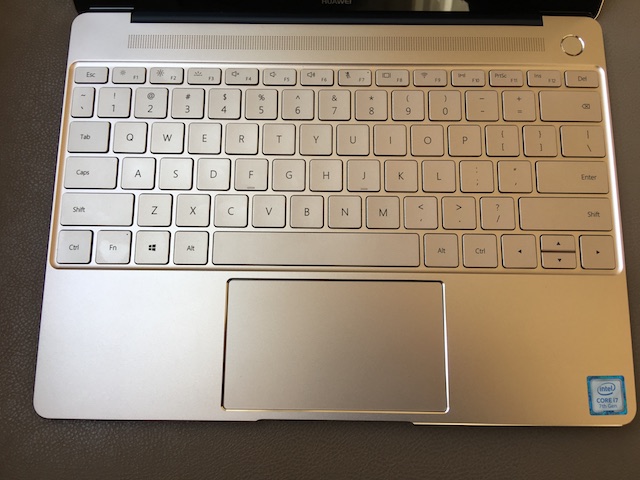
Last month, Huawei announced that it would expand the MateBook line beyond a single tablet to a total of three distinct machines -- MateBook X, MateBook E, and MateBook D. The "E" variant is the successor to the aforementioned tablet (which now comes with the keyboard), while the X and D are traditional 13 and 15.6-inch laptops, respectively. Sadly, exact availability and pricing for the USA was unknown. Today this changes, as Huawei not only reveals cost and pre-order date, but configuration options too. 


"Since we unveiled the new MateBooks in May, we've received positive feedback about our PC designs, portability and build quality. We are excited to expand our device lineup in the U.S. with the addition of the latest MateBooks. We pushed the limits of what's possible to deliver all-in-one devices that could do everything customers need, seamlessly -- from sun up to sun down. Creating the best user experiences that result in long-term customer satisfaction is our priority," says Robin Zhu, President, Huawei Device USA.
Huawei-2017-2
The company shares the following configurations that will be available in the USA. They will be sold at both Newegg and Amazon.
HUAWEI MateBook X
  • 7th Generation Intel Core i5 8+256GB Space Gray: $1,099.99
  • 7th Generation Intel Core i7 8+512GB Prestige Gold: $1,299.99
HUAWEI MateBook E
  • 7th Generation Intel Core m3 4+128GB Titanium Gray: $799.99
  • 7th Generation Intel Core i5 8+256GB Champagne Gold: $999.99
HUAWEI MateBook D
  • 7th Generation Intel Core i5 8+1T Champagne Gold: $699.99
Unfortunately, the configurations are a bit limited. There is only one option for the MateBook D, while with the other models, you might have to choose between the color you want and the specs you need. For example, if you want a Space Gray MateBook X with a Core i7, you are out of luck -- that CPU is a Prestige Gold-only affair. With that said, all the colors look nice, so you really can't go wrong.
Which MateBook will you pre-order tomorrow? Tell me in the comments below.